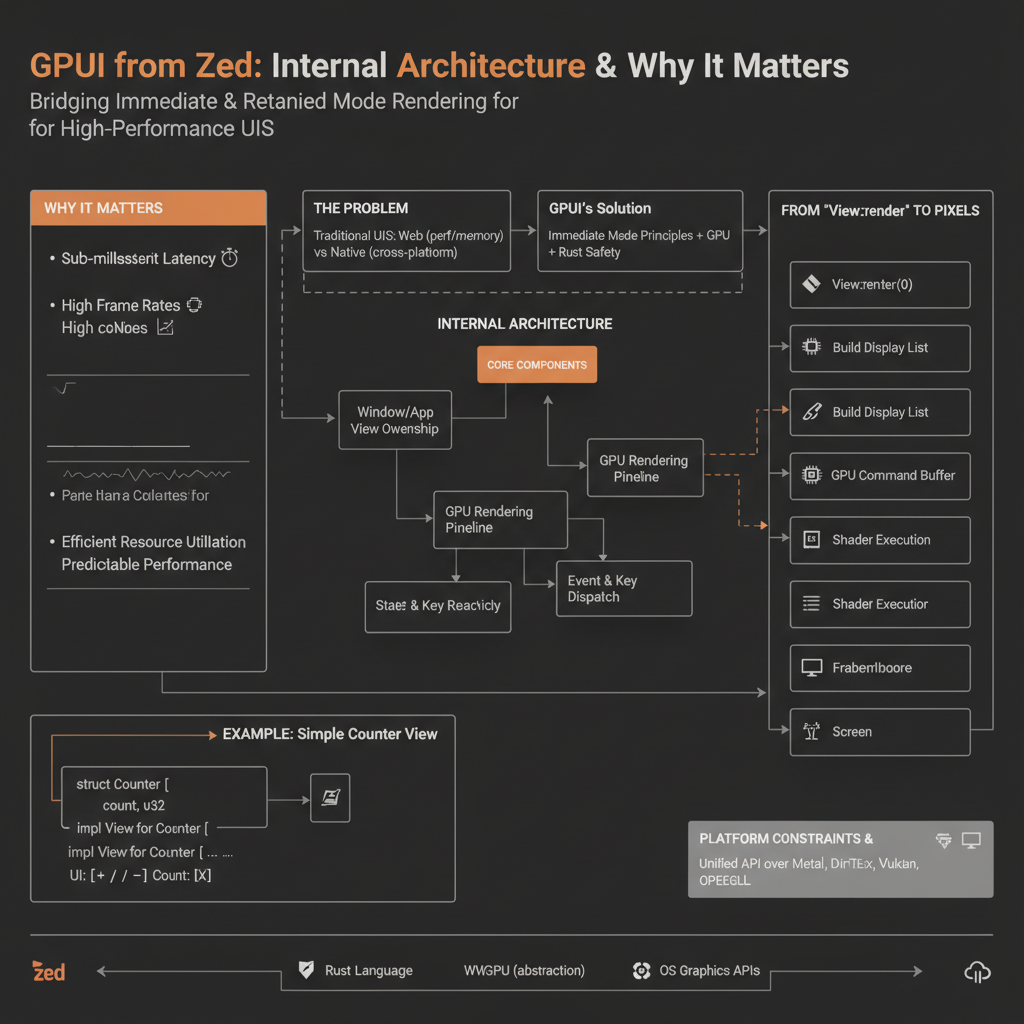
Developing high-performance, visually rich user interfaces, especially for demanding applications like code editors or integrated development environments (IDEs), is a monumental challenge. Traditional web-based UI frameworks often struggle with raw performance and memory efficiency, while native frameworks can be cumbersome for cross-platform development. This is where Zed’s GPUI framework steps in, offering a unique blend of immediate-mode rendering principles with GPU-accelerated retained-mode benefits, all within the safety and performance guarantees of Rust.
Why Understanding GPUI’s Internals Matters
For engineers building developer tools, real-time dashboards, or any application requiring pixel-perfect control and extreme responsiveness, understanding GPUI’s design is crucial. It reveals how to achieve:
- Sub-millisecond latency: Essential for typing and interactive experiences.
- High frame rates: Smooth scrolling and animations.
- Efficient resource utilization: Low memory footprint and CPU usage, even with complex UIs.
- Predictable performance: Avoiding the “jank” often associated with garbage-collected or heavily abstracted UI layers.
By dissecting GPUI, we learn how to architect systems that directly leverage the GPU, manage state reactively, and handle events with minimal overhead, insights applicable far beyond just Rust UI development.
The Problem GPUI Solves: Bridging Immediate and Retained Modes
UI frameworks generally fall into two categories:
Retained Mode: You build a scene graph (e.g., a DOM tree, a widget tree). When something changes, you modify this graph, and the framework figures out how to re-render the affected parts. Examples: HTML/CSS, GTK, Qt, SwiftUI, Iced.
- Pros: Easier to reason about state, automatic diffing/optimization, often higher-level APIs.
- Cons: Can incur overhead for diffing, difficult to achieve truly custom rendering, performance unpredictable if the framework’s internal optimizations don’t match your needs.
Immediate Mode: In every frame, you redraw the entire UI from scratch by issuing drawing commands directly. The framework retains no state about your UI structure between frames; it’s up to your code to describe the UI every time. Examples: Dear ImGui, egui.
- Pros: Extremely flexible, simple mental model (just draw what you see), often very performant for specific use cases (e.g., debug overlays).
- Cons: Can be CPU-intensive if not careful, requires re-evaluating layout and drawing logic every frame, managing complex state can be harder.
GPUI was designed to solve the specific problem of building a high-performance, highly custom code editor (Zed) that feels “snappy.” It recognized that pure immediate mode on the CPU is often too slow for complex layouts, while traditional retained mode introduces too much abstraction and overhead.
Its core design decision was to implement a hybrid architecture:
- Immediate-mode API for defining UI: Developers describe their UI in a
rendermethod that executes every frame or on state changes, issuing drawing commands. This provides flexibility and a simple mental model. - Retained-mode GPU backend: The drawing commands issued by the immediate-mode API are collected into a “scene” or display list. This scene is then efficiently processed, optimized, and rendered by the GPU using low-level graphics APIs (via
wgpu). The GPU retains the necessary buffers and textures, minimizing redundant uploads.
This hybrid approach allows GPUI to benefit from the expressiveness and flexibility of immediate-mode APIs while leveraging the GPU’s power for highly optimized, batched rendering, leading to superior performance for complex, custom UIs.
Internal Architecture: Components and Data Flow
GPUI’s architecture is built around a few core concepts and components that orchestrate the entire UI lifecycle, from event handling to pixel rendering.
Core Components Explained:
Application(orApp): The entry point of a GPUI application. It initializes thePlatformabstraction, sets up the globalAppContext, and manages the lifecycle ofWindows.- Why it exists: Provides the top-level orchestrator for the entire UI application.
- What problem it solves: Manages the global state and lifecycle that transcends individual windows.
PlatformTrait: An abstraction layer over the operating system’s native UI capabilities. It defines interfaces for creating windows, handling OS events, managing GPU contexts, accessing clipboard, etc.- Why it exists: Enables cross-platform compatibility by abstracting OS-specific APIs.
- What problem it solves: Avoids writing OS-specific code directly within the core GPUI logic, making the framework portable.
EventLoop: Continuously polls thePlatformfor new OS events (mouse, keyboard, window resize, etc.), translates them into GPUI-specific events, and dispatches them to the appropriateWindowandViews.- Why it exists: The heart of any interactive UI, processing user input.
- What problem it solves: Provides a consistent mechanism for handling asynchronous user interactions.
Window: Represents an operating system window. It holds aWindowContext, manages a tree ofViews, and is responsible for initiating the rendering process for its content.- Why it exists: The primary container for UI content visible to the user.
- What problem it solves: Manages the entire drawing surface and the hierarchy of UI elements within it.
ViewTrait: The fundamental building block of GPUI’s UI. Anything that can be rendered and interact with events is aView. Views are organized in a tree structure.- Why it exists: Defines the contract for UI components.
- What problem it solves: Provides a modular, composable way to build complex UIs.
ViewContext,WindowContext,AppContext: These are context objects passed down the view hierarchy, providing access to various services and state.AppContext: Global, application-wide services (e.g., creating new windows, managing global keybindings).WindowContext: Window-specific services (e.g., managing focus, dispatching events within the window, requesting redraws).ViewContext: View-specific services (e.g., managing child views, accessing local state, scheduling rendering).- Why they exist: Provide dependency injection and access to shared resources without explicit passing through every function signature.
- What problem they solve: Simplify state management and interaction between components at different levels of the hierarchy.
SignalsandSubscriptions: GPUI’s reactive state management system.Signals hold data, andSubscriptions allowViews (or other parts of the system) to react to changes in thoseSignals, typically by invalidating their layout or requesting a redraw.- Why they exist: Provide a robust, efficient way to propagate state changes and trigger UI updates.
- What problem they solve: Avoids manual polling or complex callback chains for state synchronization.
LayoutEngine: Responsible for calculating the size and position ofViews within aWindow. GPUI uses a flexbox-like layout system.- Why it exists: Determines the visual arrangement of UI elements.
- What problem it solves: Provides a declarative way to specify UI element positioning.
Scene Builder/Display List: During therenderphase,Views issue drawing commands (e.g., draw rectangle, draw text, draw image). These commands are not immediately sent to the GPU but collected into a structuredSceneorDisplay List.- Why it exists: Decouples UI description from GPU submission, allowing for optimization.
- What problem it solves: Enables batching, culling, and other GPU-side optimizations before rendering.
GPU Backend(wgpu) &Renderer: TheSceneis then processed by theGPU Backend, which useswgpu(a Rust-native wrapper around WebGPU/Vulkan/Metal/DX12) to translate the high-level drawing commands into low-level GPU primitives (vertices, indices, textures, shaders). TheRendererbatches these primitives and submits them to the GPU.- Why they exist: The core engine that translates abstract UI into actual pixels.
- What problem they solve: Leverages the GPU’s parallel processing power for ultra-fast rendering.
Application/App/Window/View Ownership Model
GPUI leverages Rust’s ownership system, particularly Arc<T> (Atomic Reference Counted) and Weak<T>, to manage the lifecycle and references between UI components without garbage collection.
Arc<dyn View>: Views are typically stored within anArc. This allows multiple owners (e.g., the parentView, theWindow’s internal list of children, event handlers) to hold a reference to the sameViewinstance. When allArcreferences are dropped, theViewis deallocated.Weak<dyn View>: To prevent reference cycles (e.g., a parentViewholding anArcto a child, and the child holding anArcback to the parent),Weakreferences are used. AWeakreference does not prevent the underlying object from being dropped. It can be “upgraded” to anArcif the object still exists. This is crucial for event dispatch where a child view might need to call a method on its parent without holding a strong reference that would prevent the parent from being dropped.ViewContext: When aViewis created or rendered, it receives aViewContext. This context often containsWeakreferences to its parentView, itsWindowContext, and other services. This allows theViewto interact with its environment without creating strong cyclic dependencies.
This model, while requiring careful thought from the developer, ensures memory safety and efficient resource management inherent to Rust, preventing common UI framework pitfalls like memory leaks due to forgotten event listeners or circular references.
GPU Rendering Pipeline: From View::render to Pixels
The journey from your View::render method call to actual pixels on the screen is a multi-stage, highly optimized process:
View::render(cx: &mut ViewContext):- When a
Viewis marked as dirty (e.g., its state changes, or a parent’s layout is invalidated), theWindow’s render loop will eventually call itsrendermethod. - Inside
render, your code describes the UI by calling methods oncx(e.g.,cx.rect(),cx.text(),cx.child(my_child_view)). These methods don’t draw directly but add commands to theScene Builder. 📌 Key Idea:This is the “immediate mode” part of the API. You’re describing the entire UI for this view, and its children, from scratch in response to a render request.
- When a
Layout Calculation:
- As drawing commands are added, the
LayoutEnginecalculates the bounding boxes and positions for each element. GPUI uses a custom layout system, often inspired by flexbox, to efficiently determine element geometry. This step is crucial for accurate positioning.
- As drawing commands are added, the
Scene Building (Display List):
- The
ViewContextcollects all the drawing commands and their calculated layouts into a structuredSceneobject (often referred to as a display list). This scene is a high-level representation of what needs to be drawn, not how it’s drawn on the GPU. It includes rectangles, text runs, images, masks, etc., along with their colors, transforms, and clipping regions.
- The
Tessellation and Batching:
- The
Sceneis then passed to theGPU Backend. This is where the magic of optimization happens. - Tessellation: High-level shapes (e.g., rounded rectangles, complex text glyphs) are converted into basic GPU primitives: triangles. For example, a single
cx.rect()might become two triangles. - Batching: The backend intelligently groups similar drawing commands together. For instance, all rectangles with the same color and shader might be combined into a single draw call. All text using the same font and color might be batched. This minimizes the number of expensive “draw calls” to the GPU.
- Text Rendering: Text is often a special case. GPUI pre-renders glyphs into texture atlases, then draws these glyphs as textured quads, further optimizing text rendering performance.
- The
wgpuIntegration and Shader Pipelines:- The batched primitives (vertices, indices) and associated textures are uploaded to the GPU via
wgpu. - GPUI defines a set of highly optimized GPU shaders (GLSL/WGSL) for various drawing tasks (e.g., solid colors, textured quads, blurred backgrounds, masked shapes).
- The
Rendererselects the appropriate shader pipeline for each batch of primitives, binds the necessary textures and buffers, and issues the draw commands towgpu.
- The batched primitives (vertices, indices) and associated textures are uploaded to the GPU via
GPU Execution:
- The GPU executes these commands in parallel, rasterizing the triangles, applying textures, running shaders, and ultimately writing the final pixel colors to the framebuffer.
- Once rendering is complete, the framebuffer is presented to the screen, showing the updated UI.
This pipeline, from high-level View::render to low-level GPU commands, is designed for maximum efficiency. The “immediate mode” API provides flexibility, while the “retained mode” GPU backend handles the heavy lifting of optimization and rendering.
Event and Key Dispatch
User interaction is fundamental. GPUI’s event system is designed for responsiveness and clear delegation.
Raw OS Event Reception:
- The
Platformimplementation continuously receives raw events from the operating system (e.g.,WM_KEYDOWNon Windows,NSEventon macOS,xkbevents on Linux).
- The
GPUI Event Translation:
- The
Platformtranslates these raw events into GPUI-specific, platform-agnostic event types (e.g.,gpui::Event::KeyDown,gpui::Event::MouseMoved,gpui::Event::Resize). These events carry normalized data (e.g., keyboard codes, mouse coordinates in logical pixels).
- The
Event Loop and Window Dispatch:
- The
EventLoopreceives the translated GPUI events. - It dispatches these events to the currently active
Window. ⚡ Quick Note:Some events (likeQuitorNewWindow) might be handled directly by theAppContextorApp.
- The
View Hierarchy Traversal (Bubbling/Capturing):
- Within a
Window, events are typically dispatched to theViewthat currently has focus. - GPUI views can implement
handle_eventorkey_contextmethods. - Bubbling: If the focused
Viewdoesn’t consume an event, it might “bubble up” to its parentView, and so on, until it’s handled or reaches theWindowroot. - Capturing: Some events might be handled in a capturing phase (top-down) before reaching the target, though bubbling is more common for user input.
- Within a
Key Bindings and Command Dispatch:
- For keyboard events, GPUI has a sophisticated command system. Instead of directly handling
KeyDownevents,Views can defineActions andKeyBindings. - When a
KeyDownevent occurs, the system looks up matching key bindings based on the currentKeyContext(a stack of contexts provided by activeViews, e.g., “text_editor”, “modal_dialog”). - If a binding matches, the associated
Action(a command) is dispatched. ThisActioncan then be handled by anyViewin the hierarchy that implements the corresponding handler. - Why it exists: Decouples user input from specific UI logic, making keybindings configurable and enabling complex command palettes.
- What problem it solves: Provides a flexible, extensible, and user-customizable way to respond to keyboard input.
- For keyboard events, GPUI has a sophisticated command system. Instead of directly handling
Focus Management:
- The
WindowContexttracks whichViewcurrently has keyboard focus. This is crucial for directing keyboard events to the correct recipient. Views can request focus, and the system manages focus changes, often triggeringfocused/unfocusedevents or state changes.
- The
This event system ensures that user interactions are processed rapidly and routed efficiently to the relevant UI components, contributing significantly to GPUI’s responsive feel.
State Flow and Reactivity
GPUI embraces a reactive state management paradigm, centered around Signals and Subscriptions, to ensure the UI updates efficiently when data changes.
Signal<T>:- A
Signalis a wrapper around a piece of data (T) that can be observed for changes. When the data inside aSignalis modified, it notifies all itsSubscriptions. - Think of it like an observable or a reactive variable.
- Example:
Signal<String>for the current text in an editor,Signal<bool>for a checkbox’s checked state.
- A
Subscription:- A
View(or any other component) can create aSubscriptionto aSignal. - When a
Signalchanges, all itsSubscriptions are triggered. - Typically, a
Subscriptionwithin aViewwill invalidate theView’s layout or explicitly request a redraw of theWindow.
- A
The “Re-render Everything” Philosophy (with caveats):
- In a pure immediate-mode paradigm, you redraw everything every frame. GPUI’s API encourages this by having
View::renderdescribe the entire UI. - However, GPUI’s backend is smart. When a
Signalchanges, it might trigger a re-render of a specificViewand its children. But theScene BuilderandGPU Backendwill then efficiently re-tessellate and re-batch only what truly changed or needs an update, minimizing GPU work. - The efficiency comes from the GPU’s ability to quickly render triangles, not from complex CPU-side diffing of UI trees. The CPU work is primarily focused on re-running
rendermethods and layout.
- In a pure immediate-mode paradigm, you redraw everything every frame. GPUI’s API encourages this by having
ReadHandleandWriteHandle:- GPUI often provides
ReadHandles for immutable access to state andWriteHandles for mutable access. This enforces Rust’s borrowing rules and helps prevent data races. 🧠 Important:Modifying aSignaltypically requires aWriteHandleand will trigger subscriptions. Reading from aSignalvia aReadHandledoes not.
- GPUI often provides
Example: A Simple Counter View
Let’s imagine a CounterView that displays a number and has a button to increment it.
// Simplified, not a full runnable example, focuses on state
use gpui::{
    App, AnyView, Element, Render, View, ViewContext, WeakView, WindowContext,
    Model, Mutable, State,
}; // Assume these are available and correctly imported

// 1. Define the View's internal state
struct Counter {
    count: Mutable<i32>, // Mutable is GPUI's Signal wrapper
}

impl Counter {
    fn new(cx: &mut WindowContext) -> View<Self> {
        cx.new_view(|cx| {
            // Subscribe to our own state changes to trigger re-renders
            cx.subscribe(&cx.view().read().count, |this, _cx| {
                _cx.notify(); // Request a redraw when count changes
            });
            Self {
                count: Mutable::new(0),
            }
        })
    }
}

// 2. Implement the Render trait for the View
impl Render for Counter {
    fn render(&mut self, cx: &mut ViewContext) -> impl Element {
        let count_value = self.count.read(cx); // Read current count
        let increment_button = gpui::button("Increment") // Simplified button creation
            .on_click(cx.listener(|this, _, cx| {
                // When button is clicked, increment count
                this.count.update(cx, |count| *count += 1);
            }));

        // Describe the UI
        gpui::div()
            .flex_row()
            .justify_center()
            .items_center()
            .child(gpui::text(format!("Count: {}", count_value)))
            .child(increment_button)
    }
}

// In your main application setup:
fn main() {
    App::new().run(|cx| {
        cx.open_window(gpui::WindowOptions::default(), |cx| {
            // Create and return the CounterView
            Counter::new(cx)
        });
    });
}
When the increment_button is clicked:
- The
on_clicklistener is triggered. this.count.update(cx, |count| *count += 1);modifies theMutable<i32>.- The
Mutablenotifies its subscribers. - The
cx.subscribeclosure forCounteris called, which then calls_cx.notify(). _cx.notify()marks theCounterViewas dirty and requests a redraw for its window.- In the next frame, the
Window’s render loop callsCounterView::render. self.count.read(cx)retrieves the new count value.- The UI is re-described with the updated count, and the
Scene Buildercreates a new scene. - The
GPU Backenddetects the change in the text element and efficiently updates the corresponding glyph textures or re-renders the text, presenting the new count to the user.
This pattern of “state changes -> notify() -> render()” is central to GPUI’s reactivity.
Platform Constraints and Abstraction
GPUI runs on macOS, Windows, and Linux, which means it must interact with disparate operating system APIs for window management, input, and graphics context creation. This is handled by the Platform trait.
PlatformTrait Definition: GPUI defines aPlatformtrait with methods likeopen_window,run_event_loop,clipboard_read,create_gpu_context,show_notification, etc.- Platform-Specific Implementations:
- macOS: Uses
AppKitfor windowing and event handling, andMetal(viawgpu) for graphics. - Windows: Uses
Win32APIs, andDirectX12(viawgpu) for graphics. - Linux: Often uses
X11orWayland(viawinitcrate for windowing/events) andVulkan(viawgpu) for graphics.
- macOS: Uses
winitandwgpu: GPUI heavily relies on two foundational Rust crates:winit: Provides a common, cross-platform API for window creation, event handling, and input. GPUI’sPlatformtrait builds on top ofwinit’s capabilities.wgpu: A GPU abstraction layer that provides a safe, idiomatic Rust API for modern graphics APIs (Vulkan, Metal, DX12, WebGPU). This is critical for GPUI’s GPU-native rendering.
By abstracting these low-level details, GPUI developers can write UI code once, and it will run consistently across supported operating systems, while still leveraging the native performance characteristics of each platform’s graphics stack.
Trade-offs and Comparisons to Other UI Frameworks
GPUI’s unique hybrid approach comes with distinct advantages and disadvantages when compared to other popular UI frameworks.
Versus egui
egui (immediate mode, CPU-first):
- Simplicity: Very easy to get started, single
uiclosure, no complex widget trees. - Rendering: Primarily CPU-rendered, then uploaded as a texture. Can be rendered to various backends (OpenGL, Vulkan, WebGL).
- Layout: Simple, often grid-based or linear. Less flexible for highly custom, overlapping layouts.
- Performance: Excellent for debug UIs, simple tools. Can struggle with very high pixel counts or complex text rendering at high frame rates due to CPU overhead.
- Trade-off: Simpler to use, but less raw performance potential for complex, custom UIs.
- Simplicity: Very easy to get started, single
GPUI (hybrid immediate/retained, GPU-first):
- Complexity: Steeper learning curve, requires understanding
Views,Contexts,Signals, and the rendering pipeline. - Rendering: GPU-native from the ground up via
wgpu, highly optimized for batching. - Layout: Custom, flexible layout system (flexbox-like) with full control over positioning and styling.
- Performance: Designed for absolute maximum performance for complex, highly interactive UIs (like code editors). Can handle millions of pixels and rapid updates with ease.
- Trade-off: More powerful and performant, but higher cognitive load and more opinionated architecture.
- Complexity: Steeper learning curve, requires understanding
Versus iced
iced (retained mode, Elm architecture,
wgpu):- Architecture: Follows the Elm architecture (Model-View-Update), making state flow explicit and predictable. Widget-based.
- Rendering: Uses
wgpufor GPU rendering, similar to GPUI in that regard. - Layout: Uses
flexboxfor layout, but within a more traditional retained widget tree. - Developer Experience: More abstract, higher-level widgets. Easier to build standard CRUD applications.
- Trade-off: Excellent for application-style UIs with standard controls, but less suited for highly custom, pixel-perfect layouts where you need to draw arbitrary shapes and text efficiently, and where the widget abstraction might get in the way.
GPUI:
- Architecture: More direct control over rendering and layout. Less rigid “Elm” structure, more about
Viewcomposition and direct drawing. - Developer Experience: Lower-level, requires more manual drawing and layout specification. Not “widget-based” in the traditional sense; you build your widgets as
Views. - Trade-off: Provides the necessary primitives for building something like a code editor from scratch, but less “batteries-included” for common UI patterns.
- Architecture: More direct control over rendering and layout. Less rigid “Elm” structure, more about
Versus Tauri (Webview-based)
Tauri (Webview-based):
- Architecture: Uses a lightweight webview (WebKit on macOS/Linux, WebView2 on Windows) to render HTML, CSS, JavaScript. Rust handles backend logic, native integration, and packaging.
- Developer Experience: Leverages existing web development skills and ecosystem (React, Vue, Svelte, etc.).
- Performance: Performance is limited by the webview engine. While modern webviews are fast, they still incur overhead compared to native GPU rendering for complex, high-frequency updates. Memory footprint is typically higher.
- Trade-off: Fast development with a familiar ecosystem, good for many applications, but not for the absolute highest performance and lowest resource usage needed for demanding developer tools.
GPUI:
- Architecture: Pure Rust, native GPU rendering. No webview.
- Developer Experience: Requires Rust expertise and learning GPUI’s specific patterns. No direct leverage of web frameworks.
- Performance: Designed for peak performance and minimal resource usage.
- Trade-off: Higher barrier to entry for web developers, but superior performance and control for specialized applications.
Versus Native UI Frameworks (Cocoa, Win32, GTK)
Native UI Frameworks:
- Architecture: OS-provided widgets, deep integration with the platform. Often retained-mode.
- Developer Experience: Uses platform-specific languages (Swift/Objective-C, C++, C#). Complex for cross-platform.
- Performance: Excellent performance for standard widgets, but customizing them heavily can be difficult or lead to “non-native” look and feel.
- Trade-off: Best for applications that want to strictly adhere to platform look and feel and use standard widgets. Cross-platform development is a major hurdle.
GPUI:
- Architecture: Cross-platform by design, renders everything itself.
- Developer Experience: Rust-native, single codebase for all platforms.
- Performance: Can achieve performance on par with or exceeding native for custom drawing, as it directly controls the GPU. Consistent look and feel across platforms.
- Trade-off: Doesn’t automatically get “native look and feel” out of the box; you have to draw it yourself. This is a conscious choice for Zed, which aims for a consistent, custom aesthetic.
Learnings for Engineers
- Frontend Engineers: GPUI demonstrates how to achieve web-like reactivity (
Signals) and component composition (Views) without the overhead of a DOM or JavaScript engine. It forces a deeper understanding of the render pipeline and GPU capabilities. - Backend Engineers: The
Arc/Weakownership model, event dispatch, and concurrency patterns in GPUI are excellent examples of applying Rust’s strengths to complex, interactive systems, mirroring challenges in high-performance backend services. ThePlatformabstraction is a prime example of good interface design for portability.
Performance Characteristics, Trade-offs, and Optimization Techniques
GPUI’s performance is a result of several deliberate design choices:
- GPU-Native Rendering: By offloading almost all drawing to the GPU, GPUI minimizes CPU work. The GPU is a highly parallel machine, perfectly suited for rendering millions of pixels efficiently.
- Efficient Batching: The
Scene BuilderandGPU Backendare designed to combine as many drawing operations as possible into single GPU draw calls. This reduces driver overhead and keeps the GPU pipeline full. - Minimal CPU-GPU Synchronization: Frequent synchronization between CPU and GPU is a performance killer. GPUI aims to build the entire scene on the CPU and then submit it to the GPU as a single, large command buffer, reducing synchronization points.
- Custom Layout System: Instead of relying on a generic, slow layout engine, GPUI implements a highly optimized, flexbox-like layout system that is fast enough to run every frame if needed.
- Text Rendering Optimization: Text is notoriously hard to render efficiently. GPUI uses techniques like glyph atlas caching and signed distance fields (SDF) for high-quality, scalable text rendering without re-rasterizing glyphs constantly.
- Rust’s Performance and Safety: Rust’s zero-cost abstractions, memory safety, and control over low-level details are foundational. No garbage collector pauses, no unexpected runtime overhead.
Trade-offs:
- Complexity: Building a GPUI application requires a deeper understanding of graphics concepts and Rust’s ownership model compared to higher-level frameworks.
- Less “Batteries Included”: GPUI provides primitives, not a vast library of pre-built widgets. You often build your components from scratch, which takes more time initially.
- Binary Size: Rust applications can sometimes have larger binary sizes than equivalent C++ or Go applications due to static linking and monomorphization, though this is often a minor concern for desktop apps.
Optimization Techniques:
- Minimize
renderMethod Work: While GPUI is fast, avoid heavy computations insiderender. Offload complex logic toModels or background tasks. - Judicious Use of
notify(): Only callcx.notify()when a visible change genuinely needs to occur. Over-notifying can lead to unnecessary re-renders. - Batching Custom Draws: If you’re implementing custom drawing logic, think about how to batch your vertices and indices to reduce draw calls.
- Texture Atlases: For custom icons or small images, combine them into a single texture atlas to reduce texture binding changes.
- Profile Your Code: Use Rust’s profiling tools (
perf,flamegraph) to identify bottlenecks in yourrendermethods or event handlers.
Common Misconceptions and What Actually Happens
Misconception: “Immediate mode means you re-render everything on the CPU every frame, so it must be slow.”
- Reality: GPUI’s API is immediate-mode, meaning you describe the entire UI for a view every time
renderis called. However, this description is collected into aScene(display list) which is then efficiently processed and rendered by the GPU. The GPU is incredibly fast at redrawing the same scene or portions of it with minor changes, especially with effective batching. The CPU work is minimized torendermethod execution and layout calculation.
- Reality: GPUI’s API is immediate-mode, meaning you describe the entire UI for a view every time
Misconception: “Rust UI is too hard/low-level for application development.”
- Reality: While GPUI is lower-level than web frameworks, it provides abstractions (
View,Context,Signal) that simplify common UI patterns significantly. It’s not like writing raw OpenGL. The difficulty is in learning its specific paradigm and ownership model, not necessarily in the sheer volume of low-level code.
- Reality: While GPUI is lower-level than web frameworks, it provides abstractions (
Misconception: “GPUI is only for code editors.”
- Reality: While Zed is its primary driver, GPUI is a general-purpose UI framework. Its strengths (performance, customizability, GPU-native) make it ideal for any application requiring high-performance, visually rich interfaces, such as data visualization tools, game editors, or creative applications.
Misconception: “Rust UI means native widgets.”
- Reality: GPUI renders everything itself. It does not use OS-provided widgets (like Cocoa buttons or GTK text inputs). This gives it pixel-perfect control and cross-platform consistency but means you have to implement the look and feel of common UI controls yourself (or use a library built on top of GPUI).
Failure Modes: What Breaks, When, and Why
Understanding how a system can fail is as important as knowing how it works.
GPU Driver Issues:
- What: Incompatible, outdated, or buggy GPU drivers can lead to visual glitches, crashes, or poor performance.
wgputries to abstract these, but it can’t fix fundamental driver problems. - When: On specific hardware configurations, especially with integrated graphics or older drivers.
- Why: The GPU backend relies on low-level graphics APIs. If the driver doesn’t implement these correctly, or has bugs, the rendering process can fail.
⚠️ What can go wrong:Black screens, corrupted textures, application crashes, extremely low frame rates.
- What: Incompatible, outdated, or buggy GPU drivers can lead to visual glitches, crashes, or poor performance.
Memory Leaks (Subtle
ArcCycles):- What: While Rust prevents many common memory leaks, it’s possible to create
Arccycles (e.g., A owns B, B owns A) ifWeakreferences aren’t used correctly. This prevents objects from being dropped, leading to increasing memory usage. - When: When
Views or other components hold strongArcreferences to each other in a cyclic manner. - Why:
Arconly drops when its reference count reaches zero. If a cycle exists, no reference count will ever reach zero. 🔥 Optimization / Pro tip:Always useWeakreferences for “back-references” or parent pointers in a hierarchy to break potential cycles.
- What: While Rust prevents many common memory leaks, it’s possible to create
Layout Thrashing / Excessive Re-renders:
- What: If
Signalsare updated too frequently, orViews callcx.notify()without proper throttling or condition checks, the UI might enter a state of constantly re-calculating layout and re-rendering, consuming excessive CPU cycles. - When: Rapid state changes, especially without debouncing or coalescing updates.
- Why: Each
notify()triggers a render cycle. If manynotify()calls happen in quick succession, the system spends too much time doing redundant work. ⚡ Real-world insight:Zed often uses smart diffing for text buffers and render invalidation at a granular level to avoid full re-renders of large text documents on every keystroke.
- What: If
Event Handling Bugs (Missed/Incorrect Events):
- What: Events might not reach the intended
View, or might be handled by the wrongView, leading to unresponsive or incorrect UI behavior. - When: Incorrect focus management,
Views not implementinghandle_eventorkey_contextcorrectly, or events being consumed prematurely. - Why: The event dispatch system relies on a correct hierarchy and focus state. Deviations can break the flow.
⚠️ What can go wrong:Keyboard shortcuts not working, mouse clicks doing nothing, UI elements becoming unresponsive.
- What: Events might not reach the intended
Shader Compilation/Runtime Errors:
- What: Errors in GPUI’s internal shaders or issues with the GPU’s ability to compile/run them can lead to rendering failures.
- When: On specific older hardware, or if there’s a bug in GPUI’s shader generation for a particular
wgpubackend. - Why: Shaders are compiled and run on the GPU. If they contain errors, the GPU cannot render the scene.
Key Engineering Insights from GPUI’s Design
GPUI offers valuable lessons for any engineer working on performance-critical interactive systems:
- The Power of Hybrid Architectures: Don’t be constrained by “either/or.” Combining the best aspects of immediate-mode (API simplicity, flexibility) with retained-mode (GPU optimization, batching) can yield superior results for specific domains.
- GPU as a First-Class Citizen: For truly high-performance UI, design your system from the ground up to leverage the GPU. Avoid CPU-heavy rendering loops if the GPU can do it faster.
- Rust’s Ownership for UI State:
ArcandWeakare powerful tools for managing complex object graphs and lifecycles in UI, providing memory safety and predictable performance without a GC. - Context Objects for Dependency Injection: Passing
ViewContext,WindowContext, andAppContextdown the hierarchy is an effective way to provide services and shared state without tight coupling. - Reactive State is Essential: A robust, observable state system (
Signals) simplifies UI updates and makes reasoning about data flow much clearer. - Abstraction for Portability: The
Platformtrait demonstrates how to build cross-platform applications by cleanly separating platform-specific details from core logic. - Command-Based Input: Decoupling raw input events from application logic via a command system makes UIs more extensible, testable, and customizable.
GPUI is a testament to the idea that with careful design and leveraging modern hardware capabilities, it’s possible to build desktop applications that are not only powerful but also incredibly fast and delightful to use. It pushes the boundaries of what’s possible with Rust in the UI space, offering a blueprint for the next generation of high-performance developer tools.
References
- GPUI GitHub Repository
- Zed Editor Blog - Behind the Scenes of Zed’s UI Framework
- wgpu documentation
- winit documentation
Transparency Note
This explanation was generated based on publicly available information about Zed’s GPUI framework, its design principles, and common practices in modern GPU-accelerated UI development as of May 2026. While efforts have been made to ensure accuracy and detail, specific implementation details may evolve over time. The code snippets are illustrative and simplified to convey core concepts, not production-ready examples.